Explaining Automated Travel Expense Reporting
See the four steps automated travel expense reporting handles, where it stops, and what finance still expects from you on every trip. Includes receipt rules.


It's 10 p.m., the report is due tomorrow, and the Dallas leg of your Denver, Dallas and Atlanta trip won't reconcile. The booking confirmation shows one hotel total. The folio shows a higher one, and the card charge matches neither, so you don't know which number finance will accept.
This guide covers the four steps automated expense reporting handles and the four places it stops. You'll see what the software does at each step and what still needs your judgment. You can file one clean report without rebuilding the trip from memory.
What Automated Travel Expense Reporting Does
Automated travel expense reporting is software that builds your expense report from the records a trip already produces, instead of from receipts you collect and retype. It captures receipts and trip data, sorts each charge into a category, checks it against company policy and assembles a draft for you to review and submit.
The difference from a manual process is who does the matching. Without automation, you pair each receipt with its card charge, look up the policy and fill in the form line by line. With it, you photograph a dinner receipt and the tool reads it, so a draft builds while you travel. You handle what the tool can't read, such as why you took a client to dinner.
Reviewers also change how they work. They spend their time on flagged exceptions instead of every line.
What Gets Automated, Step by Step
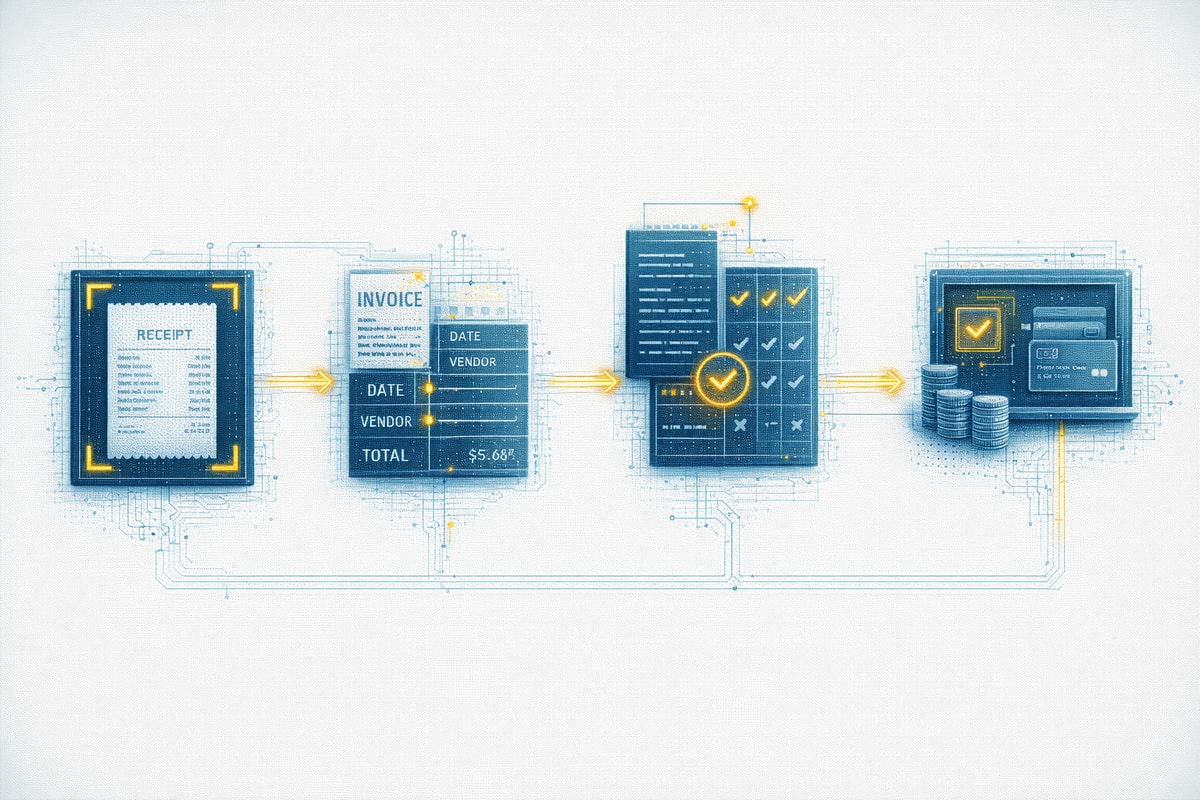
Automation moves a trip's records through four steps, and each step works from the output of the one before it. A receipt becomes a categorized entry, then a checked entry, then one line in a finished report. An unreadable receipt at capture shows up later as a flag at the policy check.
Capture
Capture pulls in receipt photos, card transactions and booking data. OCR reads the merchant, date, amount and tax from a photographed receipt, and a corporate card feed imports each charge. Many tools give you an inbox address, so you can forward your trip confirmations, and the tool parses them into trip details. The tool then pairs each receipt with its card charge by amount, date and merchant, and an entry with no match gets flagged so you can find the missing receipt or charge.
Categorization
Categorization puts each entry in a bucket such as airfare, lodging, meals, ground transport or incidentals. The Denver hotel goes to lodging, and the Atlanta airport rideshare goes to ground transport. Many tools also let you tag a charge as business or personal.
The tool's category isn't always right. A restaurant charge looks the same whether it covered a client dinner or a meal for one, and many policies treat the two differently. The tool files it under meals, and you correct it if the purpose was different.
Policy Checks
Policy checks compare each entry against company rules before you submit. Typical checks cover per diem caps by city, receipt thresholds, category spend limits, duplicate charges and dates outside the trip window. A Dallas dinner over the meal cap gets flagged, and so does a second charge with the same merchant, date and amount.
A flag leads to one of two outcomes, depending on whether your company set hard or soft policies. A hard rule can't be overridden, so the system blocks the entry until you fix it. A soft rule shows you a flag, you explain the overage, and your manager can approve the exception.
Report Assembly
Report assembly gathers the categorized entries, receipt images and policy flags into one report for you to review and submit. For the Denver, Dallas and Atlanta trip, that means the flights, three hotel stays, the rental car and meals, with each flagged item waiting for your explanation. Your approver then reviews it before payment, and finance posts approved reports to the books, so an unsubmitted report at month-end leaves that month's travel spend incomplete.
Where Automation Stops
Automation handles the matching and checking, but four parts of a report usually stay with a person. The software works from card transactions, receipt images and booking data, and none of those show why you spent the money or settle an exception.
The four parts that stay manual:
- Business purpose comes from you. A card charge shows where you spent money but not why, so you supply the reason, and auditors filter that field for vague, repetitive purposes.
- A missing or mismatched receipt gets fixed at the vendor. The tool can flag the missing receipt, but you request the duplicate itemized receipt or final folio.
- Mixed personal and business charges get split by you. A personal room-service order on the Atlanta folio looks like any other line to the tool, so you separate it before you submit.
- Out-of-policy exceptions go to your manager for a decision. The tool can flag the overage, but your manager judges whether the client site left you a cheaper option.
Handle the first one during the trip, because a purpose written weeks later from memory tends to come out vague. Write it when you spend, naming the meeting or client and what it was for, such as "Q3 renewal dinner with the Denver account team" rather than "business meal." If the charge covered a client, add who attended, since many policies ask for attendees on client meals.
What to Look For in Automated Travel Expense Reporting Software
Judge a tool on how much of the report it builds without you and what it hands to finance, because a long feature list says little about either.
Look for these capabilities before you commit to a tool:
- It reads receipt photos and parses forwarded confirmations into trip details.
- It pairs each receipt with its card charge and shows you every entry that failed to match instead of dropping it.
- It accepts the rules you already have, such as per diem caps by city and receipt thresholds.
- It lets you decide which rules block an entry and which only flag it.
- It keeps an audit trail that shows who changed or approved each line, and it routes a flagged report to the right manager.
- It gives a clear answer on how approved reports reach your accounting system, since some tools sync directly and others export a file.
The audit trail, routing and accounting answers decide how much re-entry finance does after approval, so get them before you sign.
Why Booking Records, Folios and Card Statements Disagree
Reconciliation starts from the booking record. You compare it against the hotel folio and the card statement, and when the totals differ, you have to explain why before finance asks. One hotel stay leaves three records, and each can show a different total:
- The booking confirmation shows what you booked for the room nights, at the price quoted when you booked.
- The hotel folio shows the final bill, including taxes collected at checkout and anything charged to the room.
- The card statement may show an authorization hold first and the posted charge later, and a summary charge on its own itemizes nothing.
Resort fees add another mismatch. Hotels can list the room rate and a resort fee separately without ever adding them up, a practice called partitioned pricing. The total you saw at booking can then differ from the folio before you've changed anything.
The disagreement lands on you at report time. A report built from the confirmation total falls short of the folio, and the reviewer sees a difference you have to explain. A report with no confirmation to start from leaves you rebuilding the stay from the other two records.
Otto the Agent covers the first record. Book through Otto, and every flight, hotel and rental car it plans and books for your specific needs comes with an expense-ready PDF receipt stored with the trip, with full receipt details. Otto can send those receipts directly to expense tools like Ramp, Expensify and Emburse, so you don't dig through confirmations to prove what you booked.
It stores receipts at the trip level and has no reporting dashboard, so it supplies the booking record while your expense tool builds the report. Otto works in web, iOS and Android apps, and MCP-enabled experiences, plus Slack and Microsoft Teams, so you can book where you already work.
What Finance Checks Before It Approves a Report
Finance approves a line when it can answer four questions: what you spent, when and where, why, and whether the paperwork backs it up. The IRS substantiation rules require the amount, date, place and business purpose of each travel expense. Software drafts most of that record, and you confirm it before you submit.
Timing is a second check. Under an accountable plan that uses the IRS fixed-date method, expenses substantiated within 60 days of being paid or incurred count as timely. Any excess advance has to be returned within 120 days.
Receipts are the third. The same rules require documentary evidence for any lodging expense and for any other expense of $75 or more, with an exception for transportation charges when a receipt isn't readily available.
Start Each Expense Report From a Clean Booking Record
Automation can only match what the records say, so a booking record that differs from the folio and the card statement sends the report back to you. A missing document is one of the common causes of expense report rejections. A clean booking record settles the first of those three records before the trip starts. You still collect the hotel folio at checkout.
Otto covers that first record. Travelers finish the booking directly in the same conversation they started it, and Otto produces an expense-ready PDF receipt for what they bought. Reviewers start from a receipt that matches the purchase, and Otto can send it directly to expense tools like Ramp, Expensify and Emburse. Otto is free, with no contracts, no agent-assist fees, no minimum spend.
Let Otto handle booking receipts so every expense report starts from a record finance can match without chasing anyone.
Frequently Asked Questions
What is automated travel expense reporting?
The software captures receipts and card charges, categorizes each one, checks it against policy and builds a draft report for you to submit. You still need documentary evidence such as receipts for lodging and for expenses of $75 or more.
Which receipts do I still need to keep with automated expense reporting?
Under IRS receipt rules, you need receipts for lodging at any amount and for other expenses of $75 or more. Your employer's policy can be stricter, and some employers set a receipt threshold as low as $25. Keep every receipt that meets either test, including the PDF receipts your booking tool stores.
Can AI do my expense reports?
AI reads receipts, suggests categories and flags unusual charges, so most of a draft builds without typing. It can't know why you spent the money. You still supply the business purpose and confirm each entry before you submit, and your approver still decides on exceptions.
Can automated expense reporting handle complex travel policies?
It handles rules that compare an entry to a number or a date, such as per diem caps by city, receipt thresholds, category limits, duplicate charges and trip dates. Judgment calls, such as whether a client dinner qualified for a higher cap, still go to a person.
How can I get clean receipts for a business trip without chasing confirmations?
When a trip changes midway, chasing confirmations makes gathering receipts at report time harder. Otto stores a PDF receipt for each flight, hotel and rental car it books, so you can pull those receipts from one place or send them directly to expense tools like Ramp, Expensify and Emburse. You'll still want the hotel folio for the final bill.